
It Happened a Few Times Before, But Today I Finally Found the Real Root Cause
It was a calm afternoon, and I was about to test an API endpoint on my phone when suddenly: boom! Every single backend request failed with 500 errors.
I quickly opened a terminal, SSH'd into my cloud VPS, inspected the backend logs, and was greeted with this:
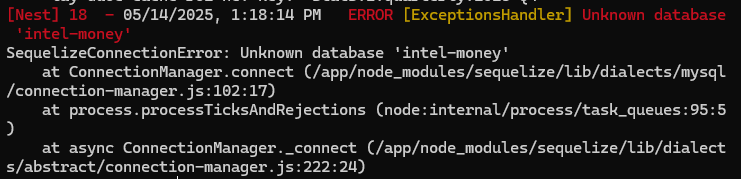
I stared at the screen in disbelief. How could the database simply vanish? My docker-compose.yml had persistent named volume mounts properly configured:
services:db:image: mysql:8restart: alwaysenvironment:MYSQL_ROOT_PASSWORD: 12345678MYSQL_DATABASE: intel-moneyvolumes:- db_data:/var/lib/mysqlports:- "3306:3306"container_name: mysql-db...volumes:db_data:
Still in denial, I jumped straight into the container shell to inspect MySQL directly:
docker exec -it mysql-db mysql -u root -p
Then ran:
show databases;
And right there, sitting amongst system tables, was an unfamiliar database: RECOVER_YOUR_DATA:
mysql> show databases;+--------------------+| Database |+--------------------+| RECOVER_YOUR_DATA || information_schema || mysql || performance_schema || sys |+--------------------+5 rows in set (0.01 sec)
I checked the contents of this mysterious database:
mysql> use RECOVER_YOUR_DATA;mysql> show tables;+-----------------------------+| Tables_in_RECOVER_YOUR_DATA |+-----------------------------+| RECOVER_YOUR_DATA |+-----------------------------+
And when querying the table:
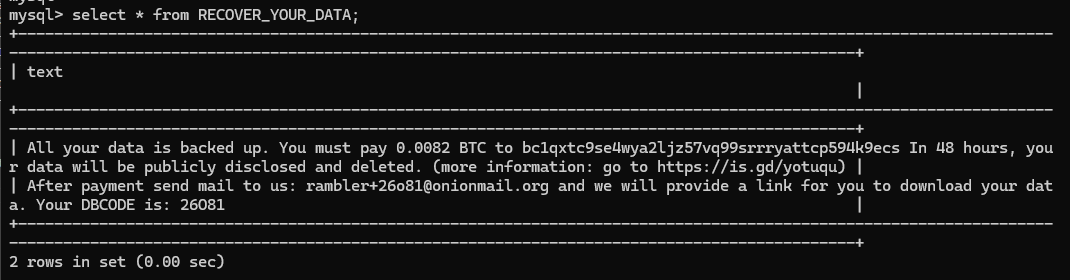
An automated scanner bot had discovered my database, dropped all business tables, and left a classic Bitcoin ransom note demanding payment to restore the data.
Thankfully, the destroyed records were staging mock data rather than production user records. But having your database dropped every three days is enough to drive any engineer crazy!
Root Cause Analysis
Sitting back and reviewing the configuration, two glaring vulnerabilities stood out:
- Unnecessarily Exposing Port 3306: I had mapped
"3306:3306"directly to the host's public IP. The backend container was running on the same Docker host and only needed internal Docker bridge network access. Exposing port 3306 to the public internet was an open invitation to scanner bots worldwide. - Trivial Root Password:
12345678. Seriously? Automated crawler bots scan thousands of IPv4 addresses per second testing default port 3306 with dictionary credentials. A brute-force attempt takes less than 2 seconds against a password like that.
Remediation Steps
1. Remove the Public Port Binding
In docker-compose.yml, remove the host port binding entirely. Communication between the API backend and the database stays strictly within Docker's private bridge network:
services:db:image: mysql:8restart: alwaysenvironment:MYSQL_ROOT_PASSWORD: STRONG_RANDOMLY_GENERATED_SECRETMYSQL_DATABASE: intel-moneyvolumes:- db_data:/var/lib/mysql# Do NOT expose port 3306 publicly!# ports:# - "3306:3306"networks:- app-networknetworks:app-network:driver: bridge
2. Generate Strong, High-Entropy Passwords
Use random cryptographic passwords with minimum 24 characters and rotate them.
3. Implement Automated Offsite Backups
To protect against catastrophic failures, I added an automated cron-based backup container:
mysql-backup:image: fradelg/mysql-cron-backuprestart: alwaysenvironment:MYSQL_HOST: dbMYSQL_PORT: 3306MYSQL_USER: rootMYSQL_PASS: ${DB_BACKUP_PASS}MYSQL_DB: intel-moneyCRON_TIME: "0 2 * * *" # Back up daily at 2:00 AMMAX_BACKUPS: "7"TZ: "Asia/Ho_Chi_Minh"volumes:- ./data/db-backups:/backupdepends_on:- db
Takeaways
- Principle of Least Privilege: Never bind internal database ports to public network interfaces unless strictly necessary (and if necessary, restrict via firewall/VPN rules).
- Enforce Password Hygiene: Never use test passwords in cloud deployments.
- Automate Backups: Reliable automated backups turn a security disaster into a minor 5-minute restore task.